First success: install, browse, and edit (~10 min)
This is the canonical tutorial for new Strixonomy users. You do not need to clone this repository.
Prerequisites: VS Code 1.85+; network access to download tutorial files (step 2). New to OWL/RDF? Skim Ontology concepts.
Write-back formats
Inspector write-back: .ttl, .obo, .owl/.rdf, .owx. Details: Supported formats.
Core path (~10 minutes)
1. Install Strixonomy
VS Code: Extensions → search Strixonomy → Install → reload if prompted. Extension id: strixonomy.strixonomy.
Cursor: install from Open VSX.
Coming from OntoCode? See v0.27 migration. Offline VSIX: Install VS Code.
2. Open a folder
Download samples, then File → Open Folder… (open the folder, not a single file).
Download strixonomy-tutorial.zip from the v0.27.0 Release, unzip, and open that folder.
mkdir strixonomy-tutorial && cd strixonomy-tutorial
curl -fsSLO https://raw.githubusercontent.com/eddiethedean/strixonomy/v0.27.0/fixtures/example.ttl
curl -fsSLO https://raw.githubusercontent.com/eddiethedean/strixonomy/v0.27.0/fixtures/complex-classes.ttl
curl -fsSLO https://raw.githubusercontent.com/eddiethedean/strixonomy/v0.27.0/examples/obo-workflow/demo.obo
mkdir strixonomy-tutorial; cd strixonomy-tutorial
Invoke-WebRequest -Uri https://raw.githubusercontent.com/eddiethedean/strixonomy/v0.27.0/fixtures/example.ttl -OutFile example.ttl
Invoke-WebRequest -Uri https://raw.githubusercontent.com/eddiethedean/strixonomy/v0.27.0/fixtures/complex-classes.ttl -OutFile complex-classes.ttl
Invoke-WebRequest -Uri https://raw.githubusercontent.com/eddiethedean/strixonomy/v0.27.0/examples/obo-workflow/demo.obo -OutFile demo.obo
Workspace Trust
Leave the folder Restricted unless you set a custom language-server path. The bundled server already works; Trust is only required for strixonomy.lspPath / strixonomy.robotPath.
3. Browse the explorer
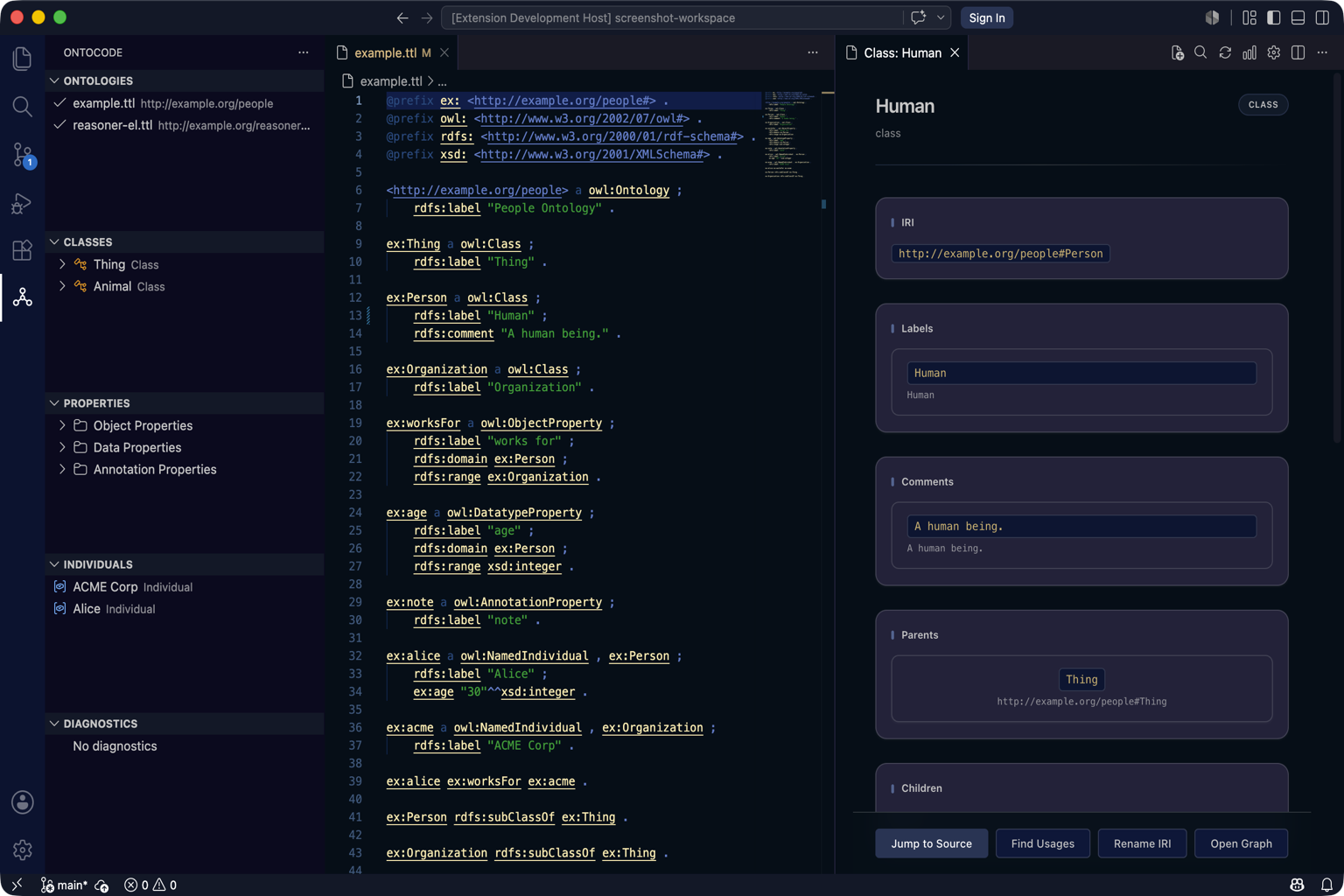
- Click the Strixonomy Activity Bar icon on the left sidebar (same strip as Explorer / Search — owl / book-style product icon). Or Command Palette → Strixonomy: Index Workspace.
- Expand Ontologies, then Classes / Properties / Individuals.
- Click
Personto open the Entity Inspector.
Success looks like
- Classes contains
Person(fromexample.ttl). - Ontologies lists
example.ttl,complex-classes.ttl, anddemo.obowith no parse errors.
If trees stay empty: run Strixonomy: Index Workspace, then check View → Output → Strixonomy Language Server.
4. Edit a Turtle entity
- With
Personselected, in the Inspector Edit section change a label or comment, or add a parent. - Confirm
example.ttlupdates on disk.
You are done with the core path. Optional follow-ups below.
Explore next (optional)
| Next | Link |
|---|---|
| Your next steps (day 2) | Edit → query → reason → CI — Your next steps |
| Query Workbench | Run SELECT short_name FROM classes — Query Workbench |
| Manchester axioms | Manchester editor |
| Reason / realize / SWRL | Reasoner · Realize · SWRL |
| Refactor / graphs / OBO / XML | Feature tour · OBO authoring · OWL/XML write-back |
| CLI / CI (optional) | Install · CI integration |
| Fit check | Known limitations · What ships today |
Troubleshooting
| Symptom | Fix |
|---|---|
| Empty explorer | Index Workspace; Output → Strixonomy Language Server |
| Cannot edit | Confirm writable format (.ttl/.obo/.owl/.rdf/.owx); see Supported formats |
| Custom LSP path ignored | Trust the workspace |
Full help: Troubleshooting · FAQ.