Strixonomy feature tour (current: v0.27)
A visual and structural overview of the Strixonomy VS Code IDE. For hands-on setup, start with First success (~10 min).
Capability truth: What ships today · Known limitations · What's new in v0.26.
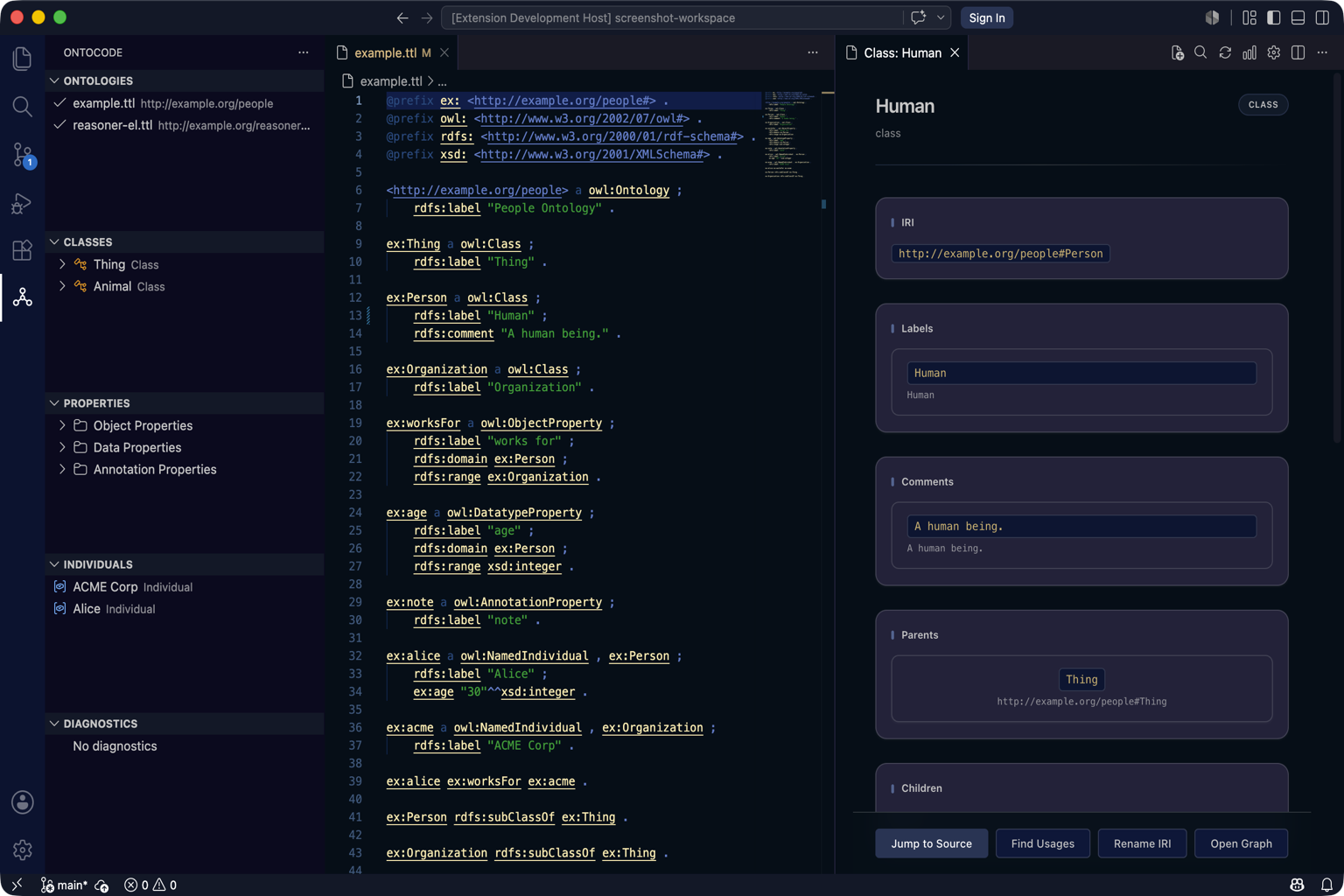
Activity bar and explorer
The Strixonomy activity bar hosts five tree views:
| View | Purpose |
|---|---|
| Ontologies | Indexed files, formats, parse status |
| Classes | Class hierarchy (asserted, or inferred/combined after reasoner) |
| Properties | Object, data, and annotation properties |
| Individuals | Named individuals |
| Diagnostics | Lint summaries grouped by severity |
Typical flow: expand Classes → click an entity name → Entity Inspector opens on the right. With Inspector and Graph panels open, the same entity stays in sync (focus relay).
Protégé-style shell (menus, perspectives, layout)
v0.17+ adds a Protégé-inspired command surface without leaving VS Code:
| Feature | What you get |
|---|---|
| Menus & dialogs | New Ontology, Prefix Manager, Metrics, About, and related commands |
| Named perspectives | Switch or save panel layouts (Modeling / Reasoning / Review) |
| Layout persistence | Panels reopen with context after reload (v0.18) |
Guide: VS Code extension · What's new in v0.17
Entity Inspector (React)
The inspector shows IRI, kind, labels, comments, parents, children, and axioms. For .ttl and .obo files, the Edit section supports labels, parents, delete, and Manchester axioms.
Write-back formats
Turtle (.ttl), OBO (.obo), RDF/XML (.owl/.rdf), and OWL/XML (.owx) support write-back. JSON-LD and line-oriented RDF are read-only. XML is semantic re-serialize — OWL/XML write-back.
Query Workbench (React)
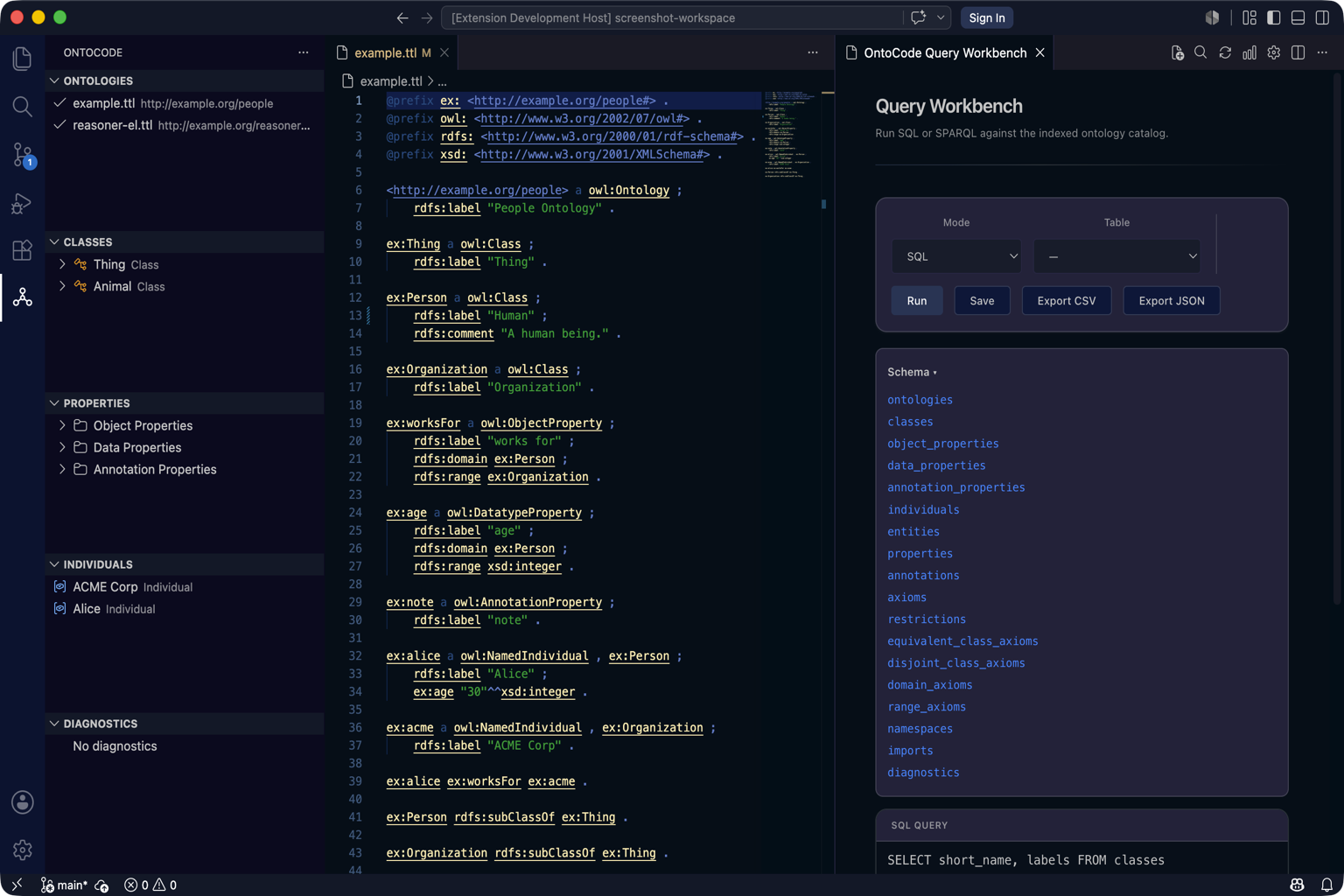
Command Palette → Strixonomy: Open Query Workbench
- Catalog SQL (subset) — virtual tables (
classes,properties,diagnostics, …). Not full SQL — noJOIN/ORDER BY/LIMIT. Prefer SPARQL for graph patterns. - SPARQL mode — graph patterns over indexed triples
- DL mode — Manchester class expressions (Instances / Subclasses / Superclasses / Equivalents); shipped v0.24+ — DL Query honesty
- Schema browser — browse tables/columns; insert names into the editor
- Export results to CSV or JSON; history and saved queries; Open as graph for result visualization (v0.26)
Guide: Query Workbench · SQL reference · DL Query
Manchester editor (React)
Opened from the inspector or Command Palette for complex SubClassOf, EquivalentClasses, and DisjointClasses axioms. Validates Manchester syntax, previews Turtle, then applies to the .ttl file.
Guide: Manchester editor
Graph panels (React)
| Command / kind | Graph |
|---|---|
| Open Class Graph | Subclass neighborhood around a class |
| Open Property Graph | Property domain/range neighborhood |
| Object / data property graphs | Dedicated property graphs (v0.26) |
| Individual / dependency / query-result / refactor-preview | Additional graph kinds (v0.26) |
| Open Import Graph | Ontology import dependencies |
| Open Neighborhood Graph | Mixed entity neighborhood |
Click nodes to jump back to the Entity Inspector. Use filters, search dimming, keyboard nav, and Graph|List alternate. Export graph JSON/CSV from the sidebar; Expand refreshes depth for large neighborhoods.
Guide: Graph view
Reasoner and explanation
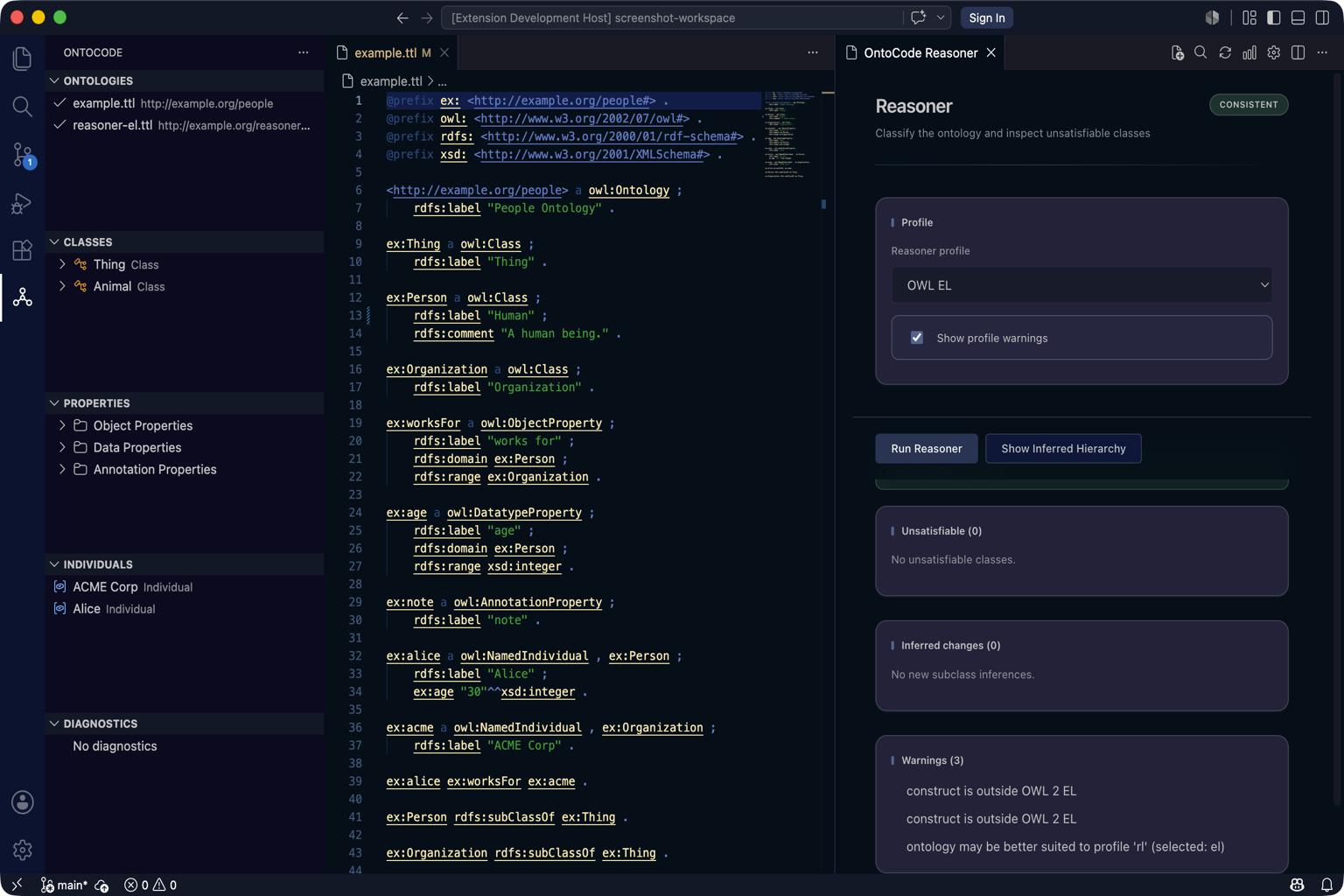
| Panel | Purpose |
|---|---|
| Reasoner | Profile, consistency, unsatisfiable classes, inferred changes, warnings |
| Explanation | DL-first justification on the DL profile; EL/RL/RDFS alternatives where supported (after reasoner run) |
Reasoner actions (v0.18): distinct Start, Synchronize, Classify, and Consistency commands. Stop cancels the in-flight client LSP request (late server results are ignored). Explanations show a stale badge when the catalog fingerprint changes while the panel stays open.
After classification, use Set Hierarchy Mode (asserted / inferred / combined) to update the Classes tree.
Guide: Reasoner · What's new in v0.18
Refactor preview and semantic diff (React)
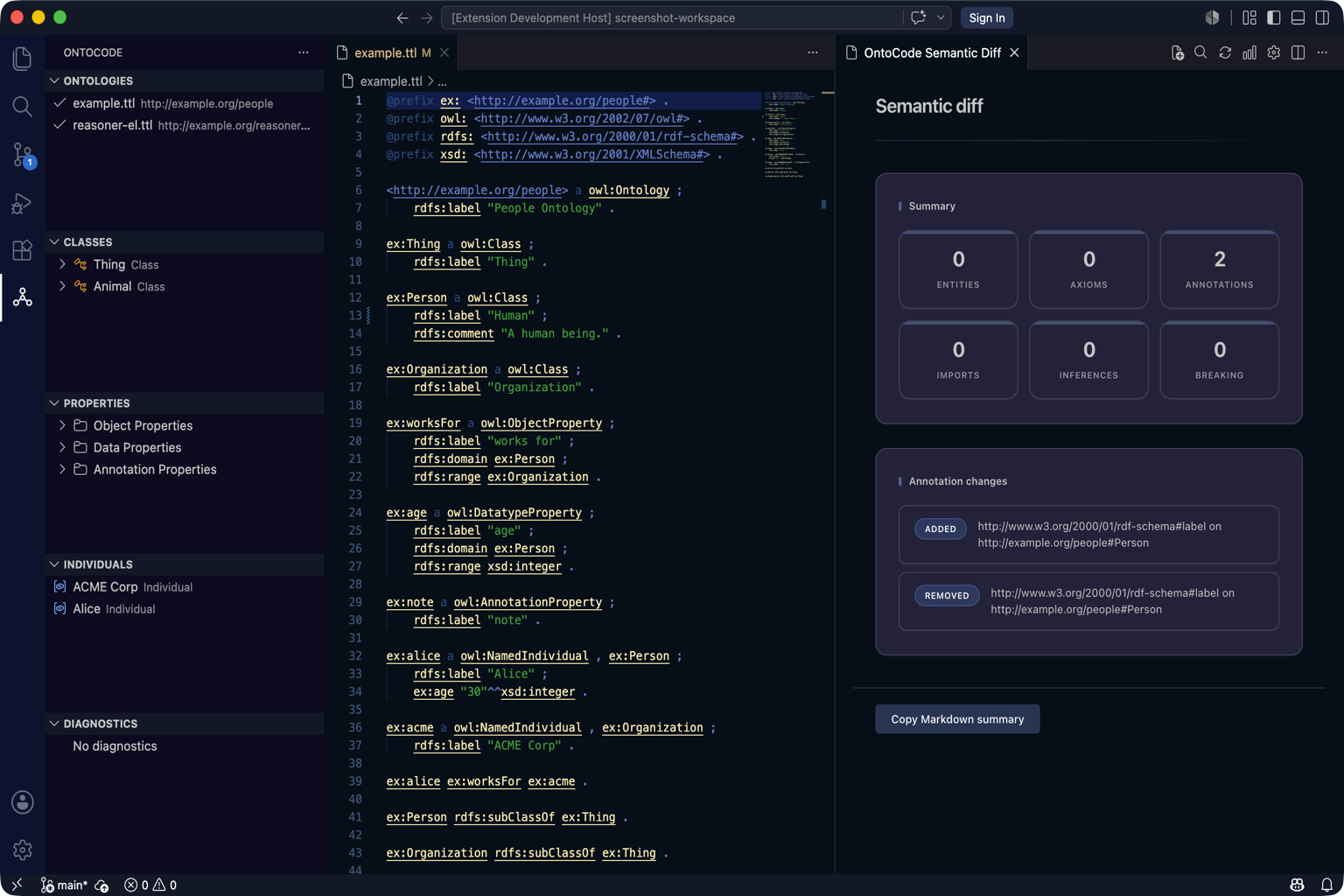
| Panel | Purpose |
|---|---|
| Refactor Preview | Diff before rename, migrate, move, or extract module |
| Semantic Diff | Compare versions, refs, or workspace snapshots — axiom-level changes and breaking-change flags |
Guides: Refactoring · Semantic diff
Manage Imports
Right-click a .ttl file in Ontologies → Manage Imports to add or remove owl:imports declarations with preview and apply.
Guide: Manage Imports
Plugins and preferences
Installed workspace plugins can contribute inspector cards, UI views, preferences, and context actions (Plugin SDK 1.0). Open plugin views from the Command Palette; preferences appear in the Strixonomy preferences hub. Provider pickers cover reasoner / query / refactor / graph actions.
Guide: Plugins · Plugin policy
Turtle semantic highlighting and diagnostics
In .ttl and .obo editors:
- Semantic tokens — namespaces, IRIs, keywords, comments
- Configurable diagnostics —
.strixonomy/diagnostics.tomlorstrixonomy.diagnostics.rules
Turtle completion and quick fixes
In .ttl editors:
- Completion on
:,<,@— prefixes, QNames, catalog IRIs - Quick fixes (lightbulb) for undefined prefix, missing label, and broken import diagnostics
Editor integration
Open any supported ontology file (.ttl, .owl, .obo, …) for hover, go to definition, outline, workspace symbols, and Problems-panel diagnostics.
Settings worth knowing
| Setting | Default | Notes |
|---|---|---|
strixonomy.lspPath | empty | Override bundled strixonomy-lsp (trusted workspaces only) |
strixonomy.hierarchy.mode | asserted | Switch after reasoner for inferred tree |
strixonomy.reasoner.default | el | Default profile for Run Reasoner |
strixonomy.indexCache | false | Optional .strixonomy/cache/ disk index |
strixonomy.diagnostics.rules | {} | Per-rule enable/severity |
Full list: Install VS Code
Next steps
| Goal | Document |
|---|---|
| Complete the tutorial | First success |
| From Protégé | Migrating from Protégé |
| CLI / CI without VS Code | Strixonomy overview |
| Limits | Known limitations |